
Published by Prompt Folks | Category: Trending Prompts | Tags: Gemini, ChatGPT, Retro, Disposable Camera, Viral Photo Prompts
The disposable camera aesthetic is everywhere right now — and for good reason. In a world full of perfectly edited, over-filtered photos, there’s something deeply human about a faded, grainy, slightly imperfect image that feels like a real memory.
People all over Instagram, TikTok, and Pinterest are using AI tools like Gemini and ChatGPT to recreate that nostalgic late-90s film look from their own selfies — and the results are stunning.
In this post, we’re giving you 5 ready-to-use disposable camera AI prompts that you can copy and paste directly into Gemini (Nano Banana), ChatGPT, or any other AI image tool. Each prompt is tested, detailed, and designed to produce consistent, viral-worthy results.
No trial and error. Just copy, paste, and create.
What is the Disposable Camera AI Trend?
The disposable camera trend started picking up massive momentum in early 2025 and has only grown since. Gen Z creators — who grew up surrounded by polished influencer photography — started craving something that felt more real. More emotional. More human.
The look they’re going for: heavy film grain, faded colours, uneven lighting, accidental light leaks, and that slightly-off-focus quality that only a cheap 90s disposable camera could produce.
What makes this trend so powerful is that it turns a perfectly clean portrait into something that feels like it was found in an old shoebox — a real memory, not a content piece.
And with AI tools like Gemini and ChatGPT now able to transform your photos with just a text prompt, anyone can get this look in seconds. You don’t need Lightroom presets, a film camera, or editing skills. You just need the right prompt.
That’s exactly what we’ve built for you here.
How to Use These Prompts
Using these prompts is simple. Here’s how to get the best results:
Step 1 — Open your AI tool Go to Gemini (gemini.google.com) or ChatGPT (chat.openai.com). Make sure you’re using a version that supports image input — Gemini Nano Banana or ChatGPT with image generation.
Step 2 — Upload your photo Upload a clear, well-lit portrait photo of yourself. A simple selfie works perfectly. Front-facing, decent lighting, no heavy filters already applied.
Step 3 — Copy the prompt Copy one of the prompts below exactly as written. The specific wording matters — each detail (grain type, colour cast, light leak direction) tells the AI exactly what kind of film effect to create.
Step 4 — Paste and generate Paste the prompt into the chat and hit generate. You may get slightly different results each time — try generating 2–3 variations and pick your favourite.
Step 5 — Share Download your result and share it on Instagram, TikTok, or Pinterest. For maximum engagement, show the before (your original photo) and after (the AI result) side by side.
The 5 Best Disposable Camera AI Prompts
Prompt 1 — Golden Hour Disposable: Solo Portrait
Best for: Instagram Reels, TikTok before/after posts, warm nostalgic content
Works with: Gemini, ChatGPT
This is the most universally loved disposable camera look. Warm, golden, slightly overexposed — it feels like a summer evening in 1998. This prompt works beautifully for solo portraits and is one of the most shared AI photo styles right now.
Use the uploaded photo as face reference. Re-imagine this person in a late-90s disposable camera photo taken outdoors during golden hour. Add heavy film grain, slight motion blur, dusty warm orange light leak from the left edge, faded colours, uneven exposure, and a soft vignette. The photo should feel candid and imperfect — like a real memory from 1998. Keep facial identity intact. Vertical 4:5 format.
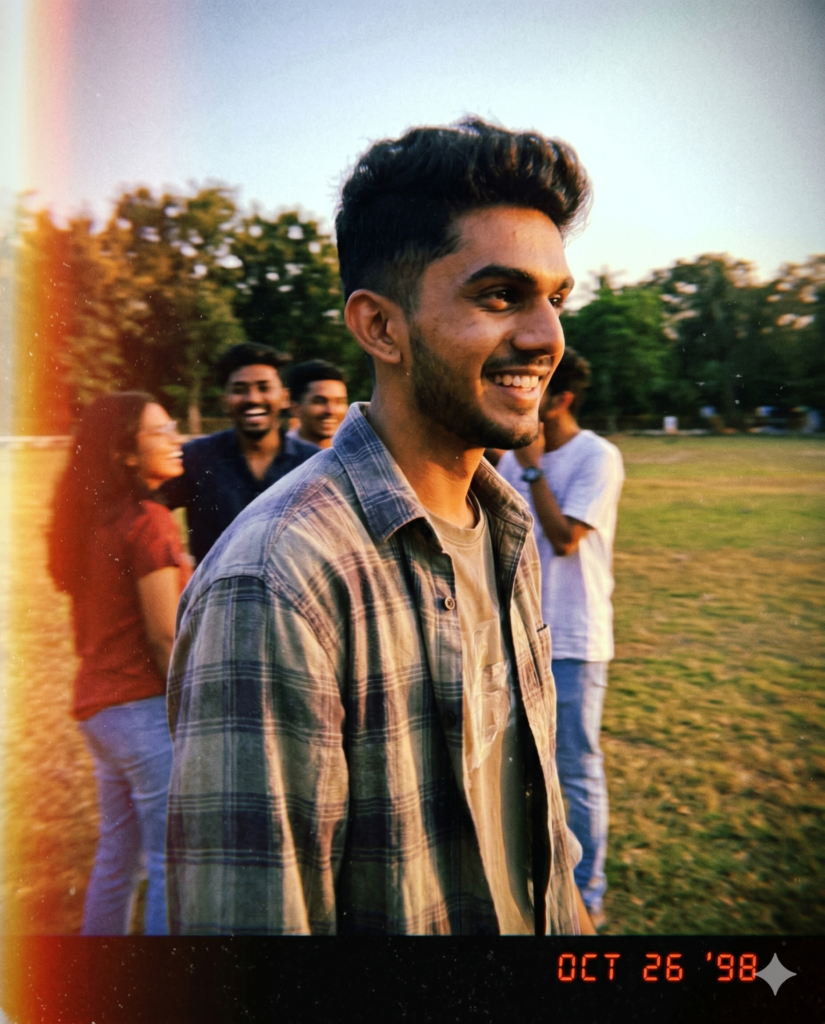
Why this prompt works: The combination of “golden hour,” “orange light leak from the left edge,” and “real memory from 1998” gives the AI very specific instructions that produce a consistently warm, nostalgic result. The instruction to “keep facial identity intact” prevents the AI from replacing your face with a generic look.
Publishing tip for Prompt Folks: Show a clean selfie on the left, the disposable camera result on the right. This before/after format gets very high shares on Instagram and works perfectly as a Reel cover image.
Prompt 2 — Rainy Day Disposable: Moody Urban Portrait
Best for: Pinterest moodboards, Instagram stories, dark aesthetic content
Works with: Gemini, ChatGPT
This is the moody, cinematic version of the disposable camera trend. Where the golden hour prompt feels warm and nostalgic, this one feels quiet and emotional — the kind of photo that makes you stop scrolling. It performs extremely well with Gen Z audiences and dark academia creators.
Use the uploaded photo as the face reference. Transform this portrait into a candid disposable camera shot taken on a rainy evening in a city. Add thick film grain, cool blue-grey colour cast, soft lens flare from a streetlight, wet atmosphere, slight underexposure, and small white scratches across the frame. The person should look like they were caught unaware — slightly off-centre, natural posture. Feeling: quiet, emotional, cinematic. Vertical format.
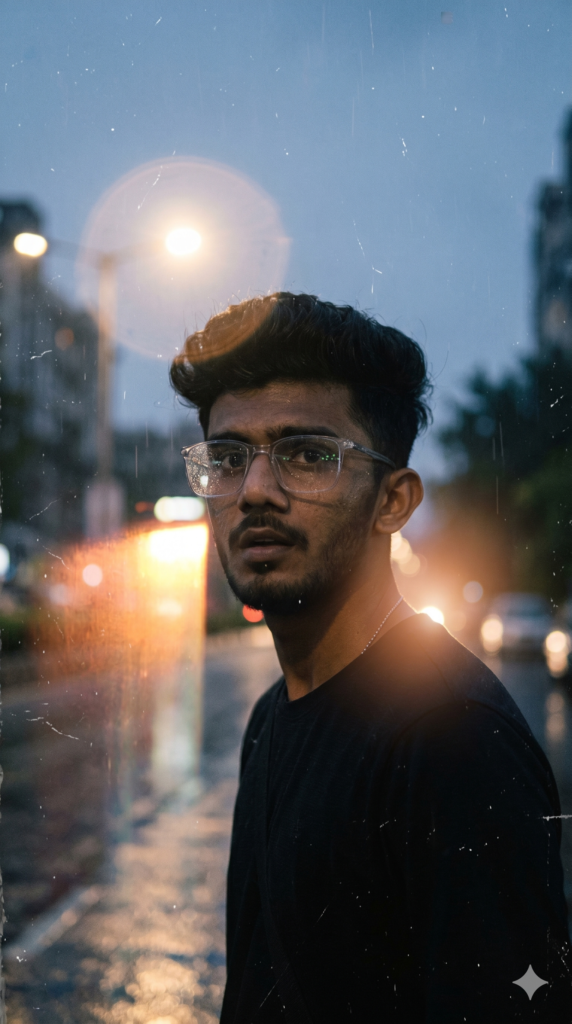
Why this prompt works: “Cool blue-grey colour cast” and “soft lens flare from a streetlight” are very specific technical instructions that push the AI toward a film photography look rather than a digital edit. The word “unaware” in the posture description encourages a candid, non-posed result.
Publishing tip for Prompt Folks: Use keywords like “moody aesthetic AI prompt” and “dark academia photo filter” in your blog description. This prompt ranks well for searches like “rainy day AI photo Gemini.”
Prompt 3 — Beach Summer Disposable: Couple Portrait
Best for: Couple content creators, anniversary posts, summer content
Works with: Gemini, ChatGPT
This is your couple prompt — and it’s one of the highest-demand categories in the disposable camera aesthetic. Summer beach photos from the late 90s have a very specific look: overexposed sky, warm sunburned tones, slightly blurry backgrounds. This prompt nails that feeling perfectly.
Use the uploaded photo of two people as face references. Re-imagine them in a candid disposable camera photo at a beach in the late 1990s. Bright overexposed sky, warm sunburned tones, heavy grain, faded teal-green water in the background, light leaks from the top right corner. Both people look happy and natural — not posed. Slightly off-focus, sun glare on the lens. The photo should feel like it was found in an old shoebox. Horizontal or vertical format.
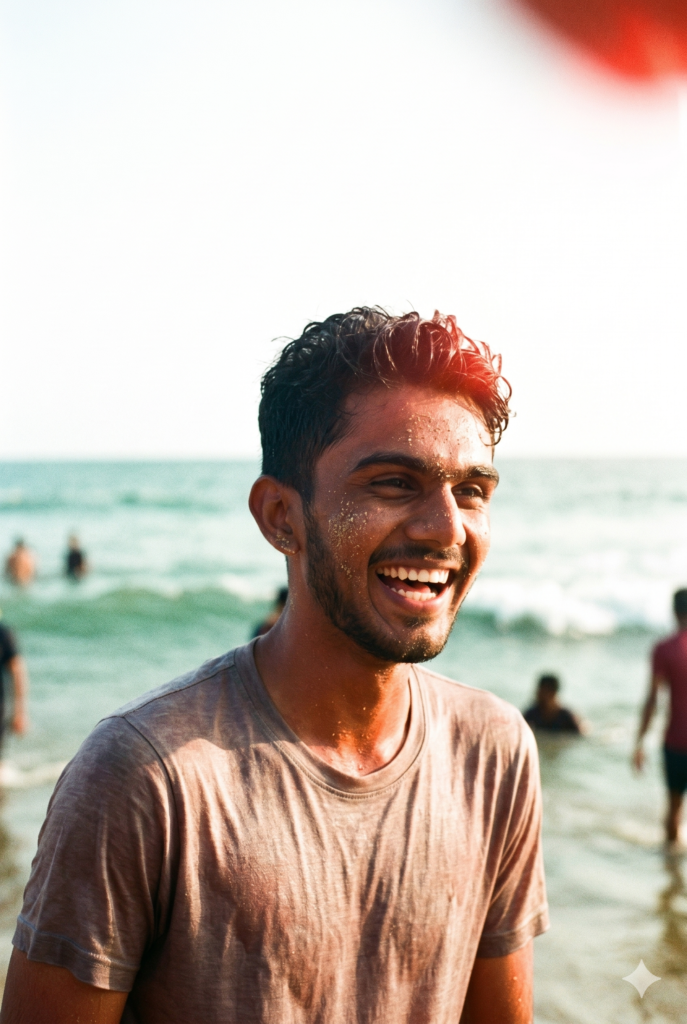
Why this prompt works: “Found in an old shoebox” is a powerful framing instruction — it tells the AI the overall age and condition of the photo, not just the aesthetic. This produces more authentic-looking film artifacts. The mention of “teal-green water” gives a specific colour anchor for the background.
Publishing tip for Prompt Folks: Consider creating a “Couple Pack” collection on Prompt Folks that groups all your couple prompts together. Couple content creators are very loyal return visitors — give them a reason to bookmark your site.
Prompt 4 — Night Party Flash: Indoor 2000s Portrait
Best for: TikTok trends, Y2K aesthetic creators, night-out content
Works with: Gemini, ChatGPT, Midjourney
This is the party photo prompt — and it captures something very specific that people absolutely love: the harsh direct flash of an early-2000s disposable camera at an indoor party. Red-eye, blown-out skin highlights, and a chaotic background. It feels like a lost photo from a night that never happened — and that’s exactly why it goes viral.
Use the uploaded image as face reference. Re-imagine this person as if photographed at an indoor party in 2003 with a cheap disposable camera. Harsh direct flash lighting, red-eye effect, slightly blown-out skin highlights, dark background, heavy grain, greenish-yellow colour cast from fluorescent lights mixing with flash. The person looks candid — mid-laugh or looking slightly away from the camera. Feeling: Y2K party, nostalgic, fun. Vertical 4:5 format.
Prompt Result:
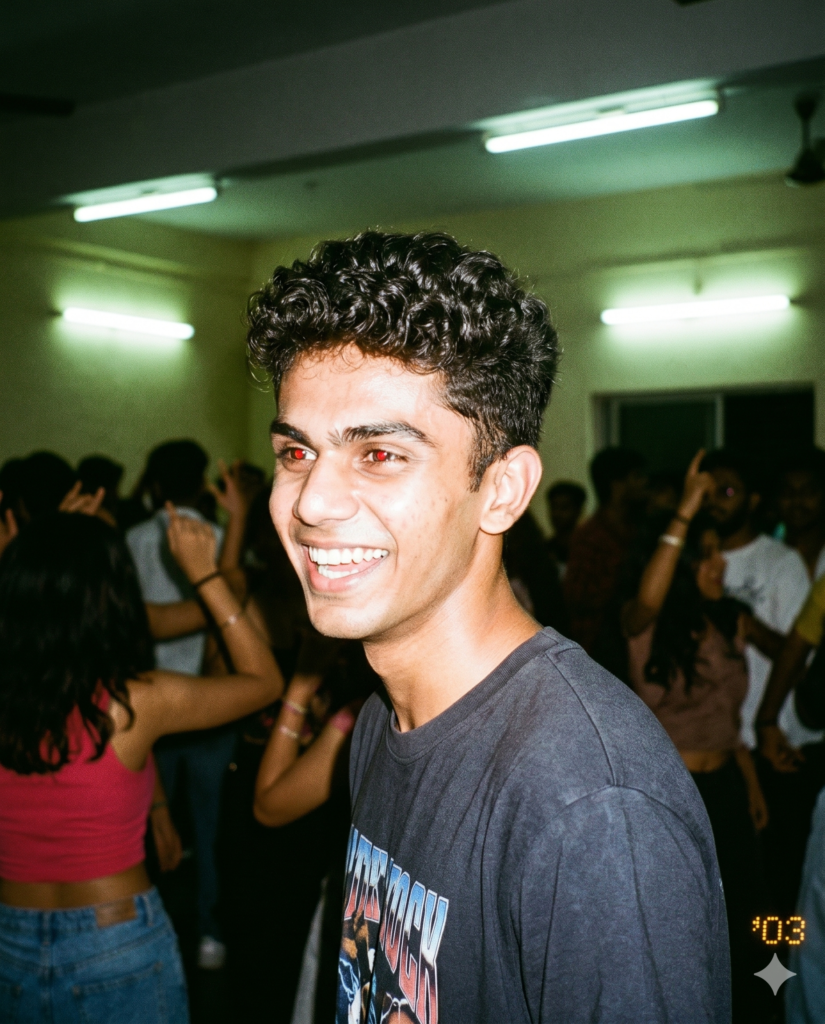
Why this prompt works: “Greenish-yellow colour cast from fluorescent lights mixing with flash” is a very specific and accurate description of how indoor party disposable photos actually look. This level of specificity is what separates a good prompt from a generic one. The emotional cues (“mid-laugh,” “Y2K party, nostalgic, fun”) guide the overall mood.
Publishing tip for Prompt Folks: Pair this with your Y2K prompts as a themed collection. The flash + party combo is trending heavily — cross-promoting within your own site keeps visitors browsing longer.
Prompt 5 — Winter Fog Disposable: Cinematic Solo
Best for: Year-round evergreen content, Pinterest, cold-weather seasons
Works with: Gemini, ChatGPT
This is your evergreen prompt — it works in any season but performs especially well in autumn and winter. The muted, desaturated look of a cold foggy morning is one of the most saved and pinned aesthetics on Pinterest. It feels melancholic and beautiful in a way that stops the scroll.
Use the uploaded photo as face reference. Re-imagine this person in a disposable camera photo taken on a cold foggy winter morning. Muted desaturated tones — pale blues, soft whites, muddy greys. Dense grain, soft focus on the background, faint breath mist near the mouth. Slight underexposure. Tiny horizontal scratches across the frame. The subject is bundled in warm clothes, looking slightly away from the camera — contemplative, quiet. Feeling: melancholic, beautiful, real. Vertical format.
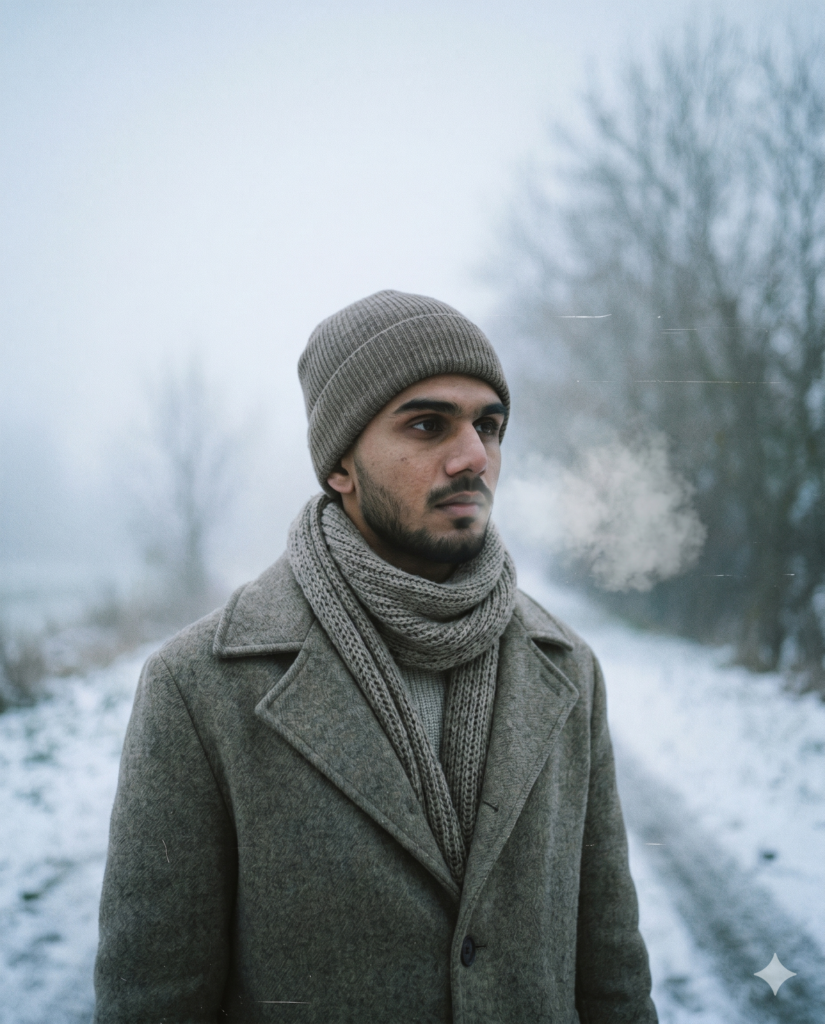
Why this prompt works: “Faint breath mist near the mouth” is a small but powerful detail that makes the image feel genuinely cold and real. “Muddy greys” as a colour description is more accurate to actual film than generic terms like “grey tones.” The emotional note — “melancholic, beautiful, real” — gives the AI a precise mood to hit.
Publishing tip for Prompt Folks: Write a dedicated blog article around this prompt for the winter season. It ranks well year-round for searches like “winter aesthetic AI photo prompt” and “cinematic Gemini portrait prompt.”
Tips for Getting the Best Results
Getting great results with disposable camera prompts comes down to a few things:
Use a good source photo. The AI needs a clear face to work with. A front-facing photo in natural light, without heavy filters already applied, gives the best starting point. Don’t upload a photo that’s already heavily edited — start clean.
Always include “use the uploaded photo as face reference.” This line at the start of every prompt is critical. Without it, many AI tools will generate a generic face instead of yours. Always include it.
Generate more than once. AI image tools produce slightly different results every time. Generate 3–5 variations and choose the best one. You’ll notice that some versions have more grain, some have stronger light leaks — pick the one that feels most like a real memory.
Try different photos. The same prompt can produce very different results depending on the source photo. Try it with different selfies — outdoors, indoors, different lighting conditions — to see which one gives you the best result.
Adjust the detail level for your tool. If you’re using Gemini Nano Banana, these prompts work as written. If you’re using ChatGPT’s image generation, you may want to add the phrase “realistic photo, not illustration” to the end of the prompt to prevent it from producing a painted look.
Why Disposable Camera Prompts Are Going Viral in 2026
The disposable camera trend isn’t just a filter. It’s a reaction.
In 2026, social media feeds are saturated with hyper-polished, AI-generated perfection. Flawless skin. Impossibly dramatic lighting. Cinematic colour grades that look like nothing in real life.
The disposable camera aesthetic is the antidote. It’s imperfect on purpose. The grain isn’t cleaned up. The colour cast isn’t corrected. The exposure isn’t balanced. And that’s exactly what makes it feel human.
Gen Z creators especially have embraced this look because it feels like resistance to the over-edited aesthetic of the influencer era. A blurry, grainy, overexposed photo from 1998 carries more emotional weight than a perfect AI render — and audiences can feel that.
That’s why these prompts work so well. They’re not trying to create a perfect image. They’re trying to create a real one.
More Trending Prompts on Prompt Folks
Love these prompts? Here are more trending categories you’ll find on Prompt Folks:
- Toy Box / Action Figure Prompts — Turn yourself into a collectible toy. One of the biggest AI trends of 2026.
- Y2K Chrome Portrait Prompts — Holographic backgrounds, chrome metallic skin, early-2000s energy.
- Couple Collage / Scrapbook Prompts — Warm overlapping printed photos in a scrapbook style.
- Indian Festival Portrait Prompts — Navratri, Holi, Diwali, and more — hand-curated for Indian creators.
- LinkedIn AI Headshot Prompts — Professional portrait prompts for job seekers and freelancers.
- Cinematic Portrait Prompts — Bollywood-style and Hollywood-style dramatic portrait prompts.
Browse our full library at promptfolks.com/search-prompts — all prompts are free, one-click copy.
Frequently Asked Questions
Can I use these prompts for free? Yes — all prompts on Prompt Folks are completely free. Just copy and paste.
Which AI tool gives the best disposable camera results? Gemini Nano Banana currently produces the most realistic and consistent film-style results for portrait photos. ChatGPT with image generation is a close second. Midjourney works well for the party flash prompt (Prompt 4) especially.
Do I need to upload my own photo? Yes — these are photo transformation prompts. You upload your selfie or portrait, and the AI re-imagines it in the disposable camera style. The prompt contains all the instructions the AI needs to create the effect.
Can I use these prompts for someone else’s photo? You can use them on photos of friends or family with their permission. Always make sure you have the person’s consent before generating and sharing AI-edited photos of them.
Why does the result sometimes look different from the example? AI image tools produce slightly different results each time, even with the same prompt. This is normal. Generate 3–5 variations and pick your favourite. If the result doesn’t match the style, try uploading a cleaner source photo.
Can I share my results on social media? Absolutely. We love seeing what you create. Tag us at @promptfolks and use the hashtag #PromptFolks so we can feature your work.
Published by Prompt Folks — Your source for free, trending AI photo prompts. Updated regularly with the latest viral prompt styles. Browse all prompts →