ChatGPT Baby Prompt Generator: Royal Jhula Heritage Photoshoot
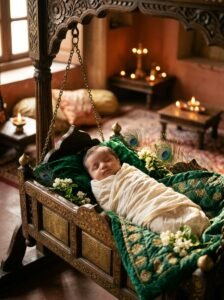
Using my uploaded photo, use my baby's face exactly as it is to create this image. Preserve my baby's exact identity, facial features, eye shape, chubby cheeks, skin tone, hair, and recognizable appearance perfectly without any distortion. Create a majestic, culturally rich royal heritage portrait of my 2-month-old baby peacefully resting inside a beautifully carved antique brass and polished teak wood cradle swing (jhula). The cradle is lined with plush royal emerald green velvet bedding and draped with fresh, fragrant garlands of white jasmine flowers (mogra) and radiant peacock feathers. The baby is dressed in a soft, miniature raw-silk cream and gold-zari traditional kurta onesie. Photography specs: Shot on Sony A7R V with an 85mm f/1.2 GM lens. Soft, warm directional temple lighting with glowing oil diyas softly blurred in the background, exquisite metallic reflections on the carved brass, photorealistic skin and fabric textures, cinematic depth of field, 8k resolution, authentic royal Indian photography.
Works best with
Upload clear close-up baby photo with natural lighting
Common mistakes
Don't use blurry, dark, or heavily filtered baby photos
How to use
Step 1: Copy Prompt Step 2: Open ChatGPT or Google Gemini Step 3: Attach clear photo of baby Step 4: Paste prompt and generate!